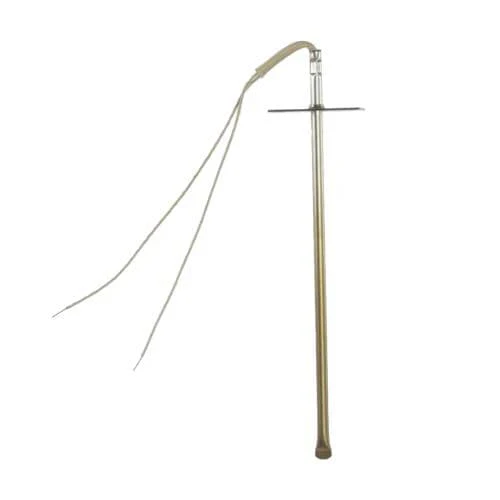
DE81-03937A Samsung Oven Temperature Sensor Kit – OEM Replacement Part
DE81-03937A Samsung Oven Temperature Sensor Kit – Fix Your Oven That Won't Heat Properly, Overheats, or Shows Incorrect Temperature
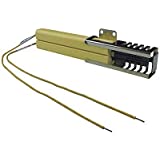
The DE81-03937A is a genuine Samsung OEM temperature sensor kit designed for Samsung ovens and ranges. This critical component monitors your oven's internal temperature and sends signals to the control board to maintain accurate heating. When this sensor fails, your oven may not heat to the correct temperature, overheat and burn food, or display temperature error codes on the control panel.
Replacing a faulty temperature sensor restores precise temperature control and ensures your oven heats accurately for perfect cooking results every time. This is a common repair part that can solve many temperature-related issues in Samsung ovens.
✓ Common Symptoms Fixed
- Oven won't heat to set temperature
- Oven overheats or burns food
- Oven temperature is inaccurate
- Temperature fluctuates during cooking
- Error codes related to temperature sensor
- Oven takes too long to preheat
- Uneven cooking or baking results
✓ Key Features & Specifications
- Part Number: DE81-03937A
- Brand: Samsung
- Part Type: Oven Temperature Sensor Kit
- Compatibility: Samsung ovens and ranges
- Function: Monitors and regulates oven temperature
- Kit Includes: Temperature sensor and mounting hardware
- Warranty: Manufacturer's warranty included
✓ Installation Tips
Difficulty Level: Moderate – Requires basic electrical knowledge
Estimated Time: 30-45 minutes
Tools Needed: Screwdriver, nut driver, work gloves
Steps:
- Disconnect power to the oven at the breaker
- Remove oven racks and locate sensor at rear of oven cavity
- Remove mounting bracket screw holding sensor in place
- Disconnect wire harness from old sensor
- Install new sensor and secure with mounting bracket
- Reconnect wire harness
- Restore power and test oven temperature accuracy
Safety Note: Always disconnect power before working on electrical appliances. If uncomfortable with electrical repairs, contact a professional technician.
✓ Why Choose XPart Supply
- 30+ Years Experience: Canadian appliance parts experts since 1994
- Genuine OEM Parts: Factory-authorized Samsung replacement components
- Expert Support: Phone and email support from knowledgeable technicians
- Fast Canadian Shipping: Quick delivery across Canada
- Guaranteed Fit: Right part for your model or your money back
✓ Frequently Asked Questions
Q: How do I know if my oven temperature sensor is faulty?
A: Common signs include inaccurate oven temperatures (verified with an oven thermometer), error codes on the display, food consistently burning or undercooking, or the oven not heating at all. You can also test the sensor with a multimeter – it should read around 1,100 ohms at room temperature.
Q: Will this sensor work with my Samsung oven model?
A: The DE81-03937A fits many Samsung oven and range models. Check your appliance's model number against the compatible models list, or contact our support team with your model number for verification before ordering.
Q: Can I install this temperature sensor myself?
A: Yes, with moderate DIY skills and basic electrical knowledge. The installation involves disconnecting power, removing the old sensor, and installing the new one. If you're uncomfortable working with electrical components, we recommend hiring a professional technician.
Q: What's the difference between OEM and aftermarket temperature sensors?
A: OEM (Original Equipment Manufacturer) sensors like the DE81-03937A are made by Samsung to exact factory specifications, ensuring accurate temperature readings and reliable performance. Aftermarket sensors may have different resistance values that can affect temperature accuracy.
Q: How can I test if the new sensor is working properly?
A: After installation, set your oven to 350°F and place an oven thermometer inside. After 20-30 minutes, the thermometer should read within 25°F of the set temperature. If it's accurate, your new sensor is working correctly.
DE81-03937A Samsung Oven Temperature Sensor Kit – OEM Replacement Part
DE81-03937A Samsung Oven Temperature Sensor Kit – Fix Your Oven That Won't Heat Properly, Overheats, or Shows Incorrect Temperature
The DE81-03937A is a genuine Samsung OEM temperature sensor kit designed for Samsung ovens and ranges. This critical component monitors your oven's internal temperature and sends signals to the control board to maintain accurate heating. When this sensor fails, your oven may not heat to the correct temperature, overheat and burn food, or display temperature error codes on the control panel.
Replacing a faulty temperature sensor restores precise temperature control and ensures your oven heats accurately for perfect cooking results every time. This is a common repair part that can solve many temperature-related issues in Samsung ovens.
✓ Common Symptoms Fixed
- Oven won't heat to set temperature
- Oven overheats or burns food
- Oven temperature is inaccurate
- Temperature fluctuates during cooking
- Error codes related to temperature sensor
- Oven takes too long to preheat
- Uneven cooking or baking results
✓ Key Features & Specifications
- Part Number: DE81-03937A
- Brand: Samsung
- Part Type: Oven Temperature Sensor Kit
- Compatibility: Samsung ovens and ranges
- Function: Monitors and regulates oven temperature
- Kit Includes: Temperature sensor and mounting hardware
- Warranty: Manufacturer's warranty included
✓ Installation Tips
Difficulty Level: Moderate – Requires basic electrical knowledge
Estimated Time: 30-45 minutes
Tools Needed: Screwdriver, nut driver, work gloves
Steps:
- Disconnect power to the oven at the breaker
- Remove oven racks and locate sensor at rear of oven cavity
- Remove mounting bracket screw holding sensor in place
- Disconnect wire harness from old sensor
- Install new sensor and secure with mounting bracket
- Reconnect wire harness
- Restore power and test oven temperature accuracy
Safety Note: Always disconnect power before working on electrical appliances. If uncomfortable with electrical repairs, contact a professional technician.
✓ Why Choose XPart Supply
- 30+ Years Experience: Canadian appliance parts experts since 1994
- Genuine OEM Parts: Factory-authorized Samsung replacement components
- Expert Support: Phone and email support from knowledgeable technicians
- Fast Canadian Shipping: Quick delivery across Canada
- Guaranteed Fit: Right part for your model or your money back
✓ Frequently Asked Questions
Q: How do I know if my oven temperature sensor is faulty?
A: Common signs include inaccurate oven temperatures (verified with an oven thermometer), error codes on the display, food consistently burning or undercooking, or the oven not heating at all. You can also test the sensor with a multimeter – it should read around 1,100 ohms at room temperature.
Q: Will this sensor work with my Samsung oven model?
A: The DE81-03937A fits many Samsung oven and range models. Check your appliance's model number against the compatible models list, or contact our support team with your model number for verification before ordering.
Q: Can I install this temperature sensor myself?
A: Yes, with moderate DIY skills and basic electrical knowledge. The installation involves disconnecting power, removing the old sensor, and installing the new one. If you're uncomfortable working with electrical components, we recommend hiring a professional technician.
Q: What's the difference between OEM and aftermarket temperature sensors?
A: OEM (Original Equipment Manufacturer) sensors like the DE81-03937A are made by Samsung to exact factory specifications, ensuring accurate temperature readings and reliable performance. Aftermarket sensors may have different resistance values that can affect temperature accuracy.
Q: How can I test if the new sensor is working properly?
A: After installation, set your oven to 350°F and place an oven thermometer inside. After 20-30 minutes, the thermometer should read within 25°F of the set temperature. If it's accurate, your new sensor is working correctly.
Product Information
Product Information
Shipping & Returns
Shipping & Returns
Description
DE81-03937A Samsung Oven Temperature Sensor Kit – Fix Your Oven That Won't Heat Properly, Overheats, or Shows Incorrect Temperature
The DE81-03937A is a genuine Samsung OEM temperature sensor kit designed for Samsung ovens and ranges. This critical component monitors your oven's internal temperature and sends signals to the control board to maintain accurate heating. When this sensor fails, your oven may not heat to the correct temperature, overheat and burn food, or display temperature error codes on the control panel.
Replacing a faulty temperature sensor restores precise temperature control and ensures your oven heats accurately for perfect cooking results every time. This is a common repair part that can solve many temperature-related issues in Samsung ovens.
✓ Common Symptoms Fixed
- Oven won't heat to set temperature
- Oven overheats or burns food
- Oven temperature is inaccurate
- Temperature fluctuates during cooking
- Error codes related to temperature sensor
- Oven takes too long to preheat
- Uneven cooking or baking results
✓ Key Features & Specifications
- Part Number: DE81-03937A
- Brand: Samsung
- Part Type: Oven Temperature Sensor Kit
- Compatibility: Samsung ovens and ranges
- Function: Monitors and regulates oven temperature
- Kit Includes: Temperature sensor and mounting hardware
- Warranty: Manufacturer's warranty included
✓ Installation Tips
Difficulty Level: Moderate – Requires basic electrical knowledge
Estimated Time: 30-45 minutes
Tools Needed: Screwdriver, nut driver, work gloves
Steps:
- Disconnect power to the oven at the breaker
- Remove oven racks and locate sensor at rear of oven cavity
- Remove mounting bracket screw holding sensor in place
- Disconnect wire harness from old sensor
- Install new sensor and secure with mounting bracket
- Reconnect wire harness
- Restore power and test oven temperature accuracy
Safety Note: Always disconnect power before working on electrical appliances. If uncomfortable with electrical repairs, contact a professional technician.
✓ Why Choose XPart Supply
- 30+ Years Experience: Canadian appliance parts experts since 1994
- Genuine OEM Parts: Factory-authorized Samsung replacement components
- Expert Support: Phone and email support from knowledgeable technicians
- Fast Canadian Shipping: Quick delivery across Canada
- Guaranteed Fit: Right part for your model or your money back
✓ Frequently Asked Questions
Q: How do I know if my oven temperature sensor is faulty?
A: Common signs include inaccurate oven temperatures (verified with an oven thermometer), error codes on the display, food consistently burning or undercooking, or the oven not heating at all. You can also test the sensor with a multimeter – it should read around 1,100 ohms at room temperature.
Q: Will this sensor work with my Samsung oven model?
A: The DE81-03937A fits many Samsung oven and range models. Check your appliance's model number against the compatible models list, or contact our support team with your model number for verification before ordering.
Q: Can I install this temperature sensor myself?
A: Yes, with moderate DIY skills and basic electrical knowledge. The installation involves disconnecting power, removing the old sensor, and installing the new one. If you're uncomfortable working with electrical components, we recommend hiring a professional technician.
Q: What's the difference between OEM and aftermarket temperature sensors?
A: OEM (Original Equipment Manufacturer) sensors like the DE81-03937A are made by Samsung to exact factory specifications, ensuring accurate temperature readings and reliable performance. Aftermarket sensors may have different resistance values that can affect temperature accuracy.
Q: How can I test if the new sensor is working properly?
A: After installation, set your oven to 350°F and place an oven thermometer inside. After 20-30 minutes, the thermometer should read within 25°F of the set temperature. If it's accurate, your new sensor is working correctly.