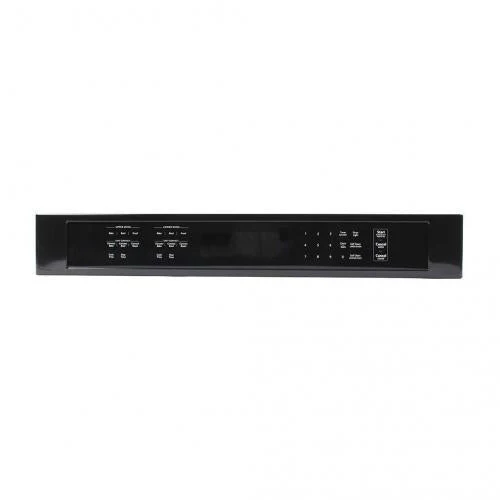
Whirlpool Range Oven Touch Pad W10916750 (Replaces W10588713, W10884534, W10890565)
W10916750 Whirlpool Range Oven Touch Pad – Fix Your Range with Unresponsive Controls, Damaged Touch Pad, or Display Issues
The W10916750 is a genuine OEM range oven touch pad (also called control panel overlay or membrane switch) for Whirlpool electric ranges. This critical component provides the user interface for controlling all oven functions including temperature selection, timer, clock, cooking modes, and settings. The touch pad features touch-sensitive buttons with printed labels and connects to the main control board via a ribbon cable. Manufactured with durable materials for reliable, long-lasting operation.
Common Replacement Reasons
This touch pad is needed when the original touch pad buttons don't respond or work intermittently, touch pad is cracked, torn, or physically damaged, printed labels are worn, faded, or illegible, touch pad has moisture damage or discoloration, buttons stick or require excessive pressure, or you're experiencing erratic oven behavior. A damaged touch pad makes it difficult or impossible to operate your range properly.
Technical Specifications & Design
Direct replacement for part numbers W10588713, W10884534, W10890565, W10913289, W11087455. Compatible with Whirlpool electric ranges. Features touch-sensitive membrane switch technology, durable overlay with printed button labels, integrated ribbon cable connector, and precise fit to OEM specifications. Installation requires basic hand tools and takes 20–30 minutes.
Installation & Compatibility
CRITICAL: Always disconnect power before servicing. Access requires removing the control panel trim or back panel. The touch pad connects via ribbon cable to the main control board. Handle the ribbon cable carefully to avoid damage. Verify proper connection and test all functions after installation.
Why Choose OEM
Genuine OEM touch pads ensure exact fit and button layout matching your range, correct labeling and graphics, reliable touch sensitivity and proper operation, and warranty compliance. Aftermarket touch pads may have incorrect dimensions causing poor fit, mismatched button layout or labels, inferior materials that fail prematurely, or poor touch sensitivity causing function issues.
Original: $459,798.67
-70%$459,798.67
$137,939.60Whirlpool Range Oven Touch Pad W10916750 (Replaces W10588713, W10884534, W10890565)
W10916750 Whirlpool Range Oven Touch Pad – Fix Your Range with Unresponsive Controls, Damaged Touch Pad, or Display Issues
The W10916750 is a genuine OEM range oven touch pad (also called control panel overlay or membrane switch) for Whirlpool electric ranges. This critical component provides the user interface for controlling all oven functions including temperature selection, timer, clock, cooking modes, and settings. The touch pad features touch-sensitive buttons with printed labels and connects to the main control board via a ribbon cable. Manufactured with durable materials for reliable, long-lasting operation.
Common Replacement Reasons
This touch pad is needed when the original touch pad buttons don't respond or work intermittently, touch pad is cracked, torn, or physically damaged, printed labels are worn, faded, or illegible, touch pad has moisture damage or discoloration, buttons stick or require excessive pressure, or you're experiencing erratic oven behavior. A damaged touch pad makes it difficult or impossible to operate your range properly.
Technical Specifications & Design
Direct replacement for part numbers W10588713, W10884534, W10890565, W10913289, W11087455. Compatible with Whirlpool electric ranges. Features touch-sensitive membrane switch technology, durable overlay with printed button labels, integrated ribbon cable connector, and precise fit to OEM specifications. Installation requires basic hand tools and takes 20–30 minutes.
Installation & Compatibility
CRITICAL: Always disconnect power before servicing. Access requires removing the control panel trim or back panel. The touch pad connects via ribbon cable to the main control board. Handle the ribbon cable carefully to avoid damage. Verify proper connection and test all functions after installation.
Why Choose OEM
Genuine OEM touch pads ensure exact fit and button layout matching your range, correct labeling and graphics, reliable touch sensitivity and proper operation, and warranty compliance. Aftermarket touch pads may have incorrect dimensions causing poor fit, mismatched button layout or labels, inferior materials that fail prematurely, or poor touch sensitivity causing function issues.
Product Information
Product Information
Shipping & Returns
Shipping & Returns
Description
W10916750 Whirlpool Range Oven Touch Pad – Fix Your Range with Unresponsive Controls, Damaged Touch Pad, or Display Issues
The W10916750 is a genuine OEM range oven touch pad (also called control panel overlay or membrane switch) for Whirlpool electric ranges. This critical component provides the user interface for controlling all oven functions including temperature selection, timer, clock, cooking modes, and settings. The touch pad features touch-sensitive buttons with printed labels and connects to the main control board via a ribbon cable. Manufactured with durable materials for reliable, long-lasting operation.
Common Replacement Reasons
This touch pad is needed when the original touch pad buttons don't respond or work intermittently, touch pad is cracked, torn, or physically damaged, printed labels are worn, faded, or illegible, touch pad has moisture damage or discoloration, buttons stick or require excessive pressure, or you're experiencing erratic oven behavior. A damaged touch pad makes it difficult or impossible to operate your range properly.
Technical Specifications & Design
Direct replacement for part numbers W10588713, W10884534, W10890565, W10913289, W11087455. Compatible with Whirlpool electric ranges. Features touch-sensitive membrane switch technology, durable overlay with printed button labels, integrated ribbon cable connector, and precise fit to OEM specifications. Installation requires basic hand tools and takes 20–30 minutes.
Installation & Compatibility
CRITICAL: Always disconnect power before servicing. Access requires removing the control panel trim or back panel. The touch pad connects via ribbon cable to the main control board. Handle the ribbon cable carefully to avoid damage. Verify proper connection and test all functions after installation.
Why Choose OEM
Genuine OEM touch pads ensure exact fit and button layout matching your range, correct labeling and graphics, reliable touch sensitivity and proper operation, and warranty compliance. Aftermarket touch pads may have incorrect dimensions causing poor fit, mismatched button layout or labels, inferior materials that fail prematurely, or poor touch sensitivity causing function issues.